Navigate
OPUS solutions use the OPUS Ensemble global user experience, which provides a simple journey across multiple TraceLink networks and products. Users can navigate to another environment, a specific product, or help documentation without needing to log out and back in.
The TraceLink website has more information about navigating with OPUS Ensemble.
Type = Fundamentals,; Topic = OPUS Solution Environment, OPUS,;Persona = Solution Designer, TraceLink Administrator, User, Orchestration Architect, Solution Partner, Technology Partner,; Orchestration = Manufacturing, Logistics, Commerce, Transportation, Clinical Supply,; Function = Supply Chain, IT, Operations, Regulatory Affairs, Quality, Commercial, Pharmacy, Project Management, Finance, Procurement, Spare 2,
Navigation overview
The OPUS Ensemble solution provides a global user experience that seamlessly delivers personalized settings, navigation, and company-specific context, providing instant access to essential tools and notifications through an intuitive, browser-like interface.
 Navigation overview
The OPUS Ensemble global user experience includes the following elements:
- Ensemble tabs
- TraceLink Account menu
- Help, Support, Community forum, and Notifications icons
- Main Menu icon
- Network composer
- Side menu
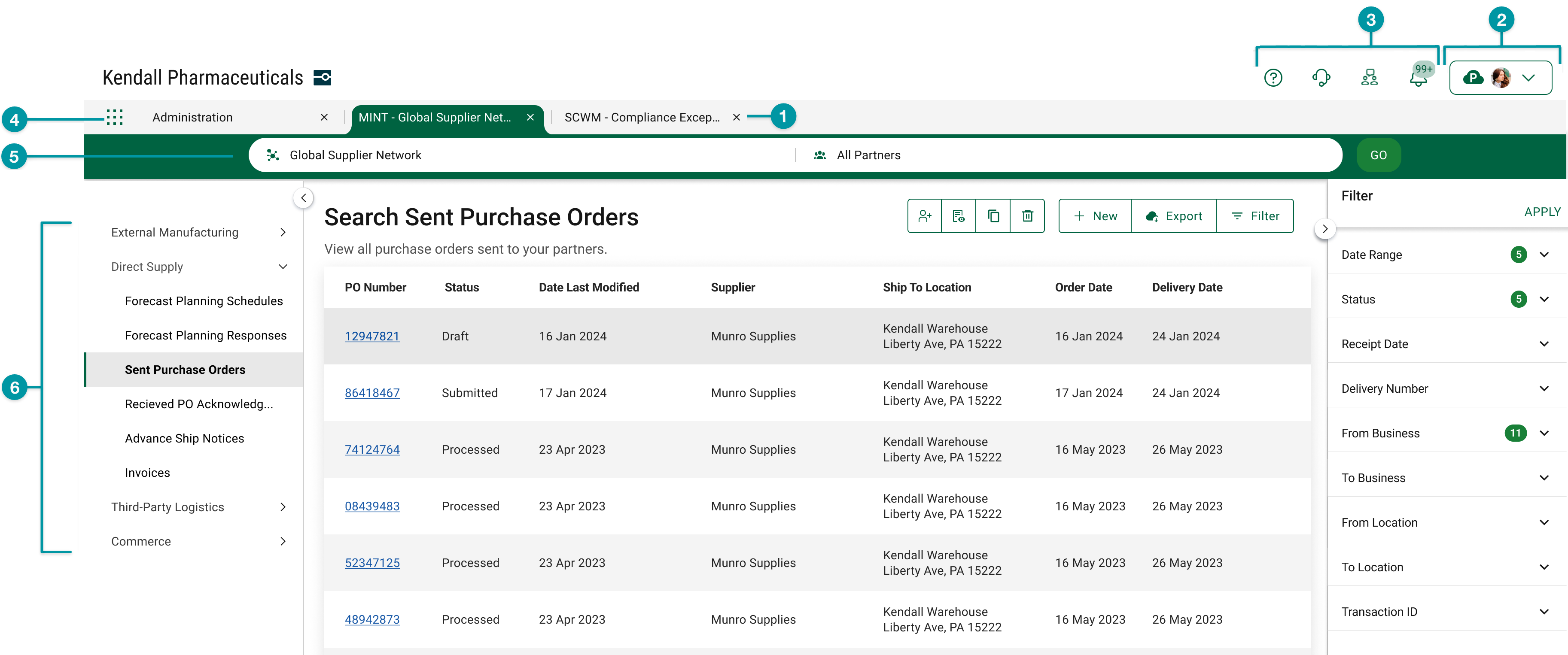
Navigate to networks, solutions, and resources
Access networks, solutions, and resources from a single location. Use the unified menu to switch between networks and solutions, view multiple solutions in one browser window, and quickly access settings, support, notifications, and community resources.
View multiple solutions in one browser window
Users can navigate across multiple TraceLink solutions in a single browser window with an intuitive, familiar tab bar that gives access to key information from multiple sources without having to switch between multiple browser windows. For example, a user who is creating a purchase order acknowledgment in MINT can view their trade partner's master data in a separate tab and switch easily between the two. Any currently open tabs will not refresh when a new tab is opened, which ensures that information persists when switching from one solution to another. When users log in, OPUS Ensemble automatically re-opens any tabs that were open the last time the user logged out, providing consistency and efficiency across multiple sessions.
 If a user has unsaved information in an OPUS Ensemble tab, the unsaved information may be lost if the user switches to another OPUS Ensemble tab without saving first. In this case, the system displays a confirmation dialog to alert the user that switching tabs may cause data loss. The user can then cancel the action, return to the original tab, and save their changes.
Access networks and solutions from a single menu
Users access all of their networks, Partner networks, and enterprise solutions via a single main menu on the left side of the header. Enterprise and multienterprise solutions are not prefixed with the company name, which allows users to identify solutions more quickly and accurately. The company name still appears as a prefix on Partner networks.
Selecting or in the main menu opens the network composer, where users select the desired network and partner or location, if applicable. The network composer only appears when viewing a multienterprise solution, which ensures that users are only presented with navigation options that are appropriate for the current solution. Enterprise solutions (e.g. Serialized Product Intelligence), including solutions that previously appeared in the side menu (e.g. Administration), now appear in the main menu as individual line items. All networks, Partner networks, and enterprise solutions open in a new OPUS Ensemble tab.
The network composer no longer includes a Process drop-down, which allows longer network names to fully display in the network composer. Instead, all processes for the selected solution are consolidated in the side menu. The processes may be categorized in drop-downs within the side menu, which ensures that the space on the screen is properly used as the number of processes increases.
Access settings, support, community forum, and notifications
The new navigation system provides access to the user's account information, settings, and notifications at the top of every browser window, and also includes links to TraceLink support, the help center for the product displayed in the active tab, which gives users access to TraceLink documentation and support resources without scrolling or leaving their current product. The navigation also provides access to the Community forum for collaboration and knowledge sharing.
Tag end
Type = How-tos, ; Topic = OPUS Solution Environment, OPUS,;Persona = Solution Designer, TraceLink Administrator, User, Orchestration Architect, Solution Partner, Technology Partner,; Orchestration = Manufacturing, Logistics, Commerce, Transportation, Clinical Supply,; Function = Supply Chain, IT, Operations, Regulatory Affairs, Quality, Commercial, Pharmacy, Project Management, Finance, Procurement, Spare 2,
Switch companies or environments
The OPUS Ensemble user experience allows you to switch between companies or environments that you have access to with the same user account (identified by an email) without logging into a separate URL.
Switch companies
- Expand the TraceLink Account menu in the header.
- Select the desired company. If you have access to multiple environments within the company, each environment appears on a separate line in the menu. The environment indicator indicates the environment type:
 – Production
 – Validation
OPUS Ensemble relaunches the tabs that were open during your most recent session.
Switch environments
- Expand the TraceLink Account menu in the header.
- Select the desired environment from the drop-down. The environment indicator indicates the environment type:
- – Production
- – Validation
OPUS Ensemble relaunches the tabs that were open during your most recent session.
Tag end
Type = How-tos, ; Topic = OPUS Solution Environment, OPUS,;Persona = Solution Designer, TraceLink Administrator, User, Orchestration Architect, Solution Partner, Technology Partner,; Orchestration = Manufacturing, Logistics, Commerce, Transportation, Clinical Supply,; Function = Supply Chain, IT, Operations, Regulatory Affairs, Quality, Commercial, Pharmacy, Project Management, Finance, Procurement, Spare 2,
Navigate to an OPUS network or app
Go to a specific network
A network allows companies to manage a business ecosystem that includes all of the linked Partners and internal locations necessary to meet specific business goals within an OPUS app. Some apps support multiple networks (e.g. Agile Process Teams).
- If you have access to multiple companies, make sure you have the correct company selected in the TraceLink Account menu.
-
Select the Main Menu
 icon.
icon. - Select or depending on the desired network.
- Select a in the header. See the quick reference for network names for a list of networks and apps.
- Select a (e.g. your entire company or a Link to a specific Partner or internal location) in the header.
-
Select the button.
The screen refreshes and displays information for the selected Network and Partner or Location.
Tips
- The side menu contains the tasks that were previously included in the drop-down in the network composer.
Go to a specific app
An enterprise app allow companies to perform tasks within their own company only (e.g. Brazil Compliance, Serialized Process Intelligence).
- If you have access to multiple companies, make sure you have the correct company selected in the TraceLink Account menu.
-
Select the Main Menu
icon. -
Select an app. See the quick reference for network names for a list of networks and apps.
A new tab opens and displays information for the selected app.
Tips
- The side menu contains the tasks that were previously included in the drop-down in the network composer.
- Select in the main menu to administer your company, an app or its network, Links, or users.
Tag end
Type = How-tos, ; Topic = OPUS Solution Environment, OPUS,;Persona = Solution Designer, TraceLink Administrator, User, Orchestration Architect, Solution Partner, Technology Partner,; Orchestration = Manufacturing, Logistics, Commerce, Transportation, Clinical Supply,; Function = Supply Chain, IT, Operations, Regulatory Affairs, Quality, Commercial, Pharmacy, Project Management, Finance, Procurement, Spare 2,
Navigate to a classic Track & Trace Services (TTS) app
Company Administration
All administration for classic TTS apps must be done within the classic user experience.
- If you have access to multiple companies, make sure you have the correct company selected in the TraceLink Account menu.
-
Select the Main Menu
icon. - Select in the main menu.
- Select .
-
Select a function from the Company Administration landing page.
Begin working in the Company Administration UI, which displays in the content area below the header.
Management
All administration for classic TTS apps must be done within the classic user experience.
- If you have access to multiple companies, make sure you have the correct company selected in the TraceLink Account menu.
-
Select the Main Menu
icon. - Select in the main menu.
- Select .
-
Select a function from the Management landing page.
Begin working in the Management UI, which displays in the content area below the header.
Master Data
Master data functionality is available with the rest of the TTS administration tasks.
- If you have access to multiple companies, make sure you have the correct company selected in the TraceLink Account menu.
-
Select the Main Menu
icon. - Select in the main menu.
- Select .
-
Select a function from the Master Data landing page.
Begin working in the Master Data UI, which displays in the content area below the header.
Tag end
Type = FAQs,; Topic = OPUS Solution Environment, OPUS,;Persona = Solution Designer, TraceLink Administrator, User, Orchestration Architect, Solution Partner, Technology Partner,; Orchestration = Manufacturing, Logistics, Commerce, Transportation, Clinical Supply,; Function = Supply Chain, IT, Operations, Regulatory Affairs, Quality, Commercial, Pharmacy, Project Management, Finance, Procurement, Spare 2,
Tag end
Type = How-tos, ; Topic = OPUS Solution Environment, OPUS,;Persona = Solution Designer, TraceLink Administrator, User, Orchestration Architect, Solution Partner, Technology Partner,; Orchestration = Manufacturing, Logistics, Commerce, Transportation, Clinical Supply,; Function = Supply Chain, IT, Operations, Regulatory Affairs, Quality, Commercial, Pharmacy, Project Management, Finance, Procurement, Spare 2,
Navigate to help documentation, support, and community forum
Navigate to the help center
Select the Help Center  icon in the header to access the one-stop-shop help center for everything related to the network you are currently within (e.g. the Supply Chain Work Management Help Center includes all FAQs, procedures, troubleshooting information, and API guides related to the functions within Agile Process Teams).
Navigate to support
Select the Support  icon in the header to access your company's Customer Success Portal. If you do not have access to the Customer Success Portal, the Support icon directs you to the TraceLink Global Support Request page.
Navigate to TraceLink Online Community
Select the Community forum  icon in the header to access the TraceLink Online Community. If you are accessing the community for the first time, register before continuing. After registering, members can participate in general forum discussions and respond to polls that guide the development of future OPUS-specific topic areas.
Tag end


