FAQs
General
 What's the difference between Serial Number Manager, Serial Number Exchange, and Serialized Operations Manager?
All three of these apps support pharmaceutical manufacturing and work together closely. However, they each play a distinct role in the manufacturing process:
- Serial Number Manager is the first step, where Pharmaceutical Manufacturers, CMOs, and Repackagers create templates that govern how serial numbers are generated (e.g. the characters and format used, the method for generating serial numbers) and then generate serial numbers or import serial numbers from external serialization managers. For more information on SNM, contact TraceLink Support.
- Serial Number Exchange comes next, where manufacturing and packaging locations can request serial numbers and perform all other activities necessary on their manufacturing or packaging lines (e.g. commission, aggregation). For more information on SNX, contact TraceLink Support.
- Finally, Serialized Operations Manager allows all warehouse locations for any business segment (e.g. Pharmaceutical Manufacturers, CMOs, 3PLs, Wholesale Distributors, large retail Pharmacies) to perform all the activities necessary in a warehouse that ships or receives product (e.g. status updates, aggregation, shipments, status queries). For more information on SOM, contact TraceLink Support.
Serial numbers
What is the full serial number life cycle?
A serial number moves through the following life cycle as it passes down the supply chain.
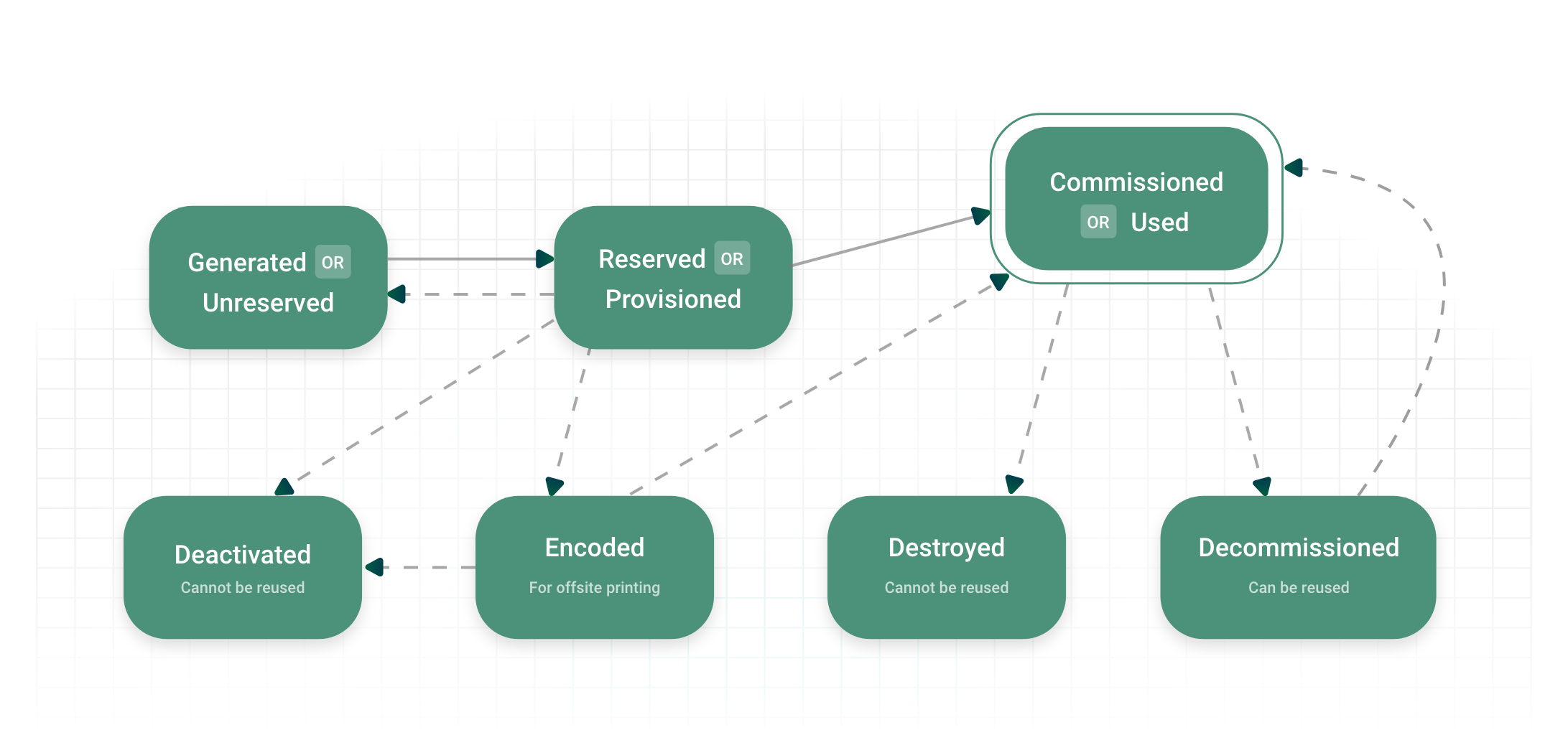
- Generated or Unreserved – The serial number is generated and available in the serial number template pool, but has not been requested by a manufacturing or packaging location yet.
- Reserved or Provisioned – A packaging location has requested and received the serial number, but the serial number has not been associated to a specific product and lot yet (i.e. commissioned).
- Commissioned or Used – The serial number is associated with either an SSCC container code or a packaging code, lot number, and expiration date.
- Encoded – The serial number is sent for pre-printing on the product labels after provisioning.
- Destroyed – The serial number is terminated. Destroyed serial numbers cannot be re-commissioned.
- Decommissioned – The serial number is no longer associated with either an SSCC container code or a packaging code, lot number, and expiration date.
- Deactivated – The serial number is deactivated. Only serial numbers in reserved or encoded states can be deactivated. Deactivated serial numbers cannot be re-commissioned.
At any point in its life, a serial number might also be Registered, which means that the serial number is registered with the company's serial number repository, either during repackaging or when the company received a shipment without corresponding EPCIS serial number data.
What transitions are available for serial number statuses?
The current serial number status determines the new serial number statuses that are available. The table below shows the current status on the left and the new status along the top. Yes indicates that the transition is allowed, and No indicates that the transition is not allowed.
Serial number statuses indicate which stage the serial number is at within its life cycle.
| Reserved | Unreserved | Encoded | Commissioned | Destroyed | Decommissioned | Deactivated | Registered | |
|---|---|---|---|---|---|---|---|---|
| Reserved | - | Yes | Yes | Yes | No | No | Yes | No |
| Unreserved | Yes | - | No | No | No | No | No | No |
| Encoded | No | No | - | Yes | No | No | Yes | No |
| Commissioned | No | No | No | - | Yes | Yes | No | No |
| Destroyed | No | No | No | No | - | No | No | No |
| Decommissioned | No | No | No | Yes | No | - | No | No |
| Deactivated | No | No | No | No | No | No | - | No |
| Registered | No | No | No | No | Yes | Yes | No | - |
What transitions are available for item statuses?
The current item status determines the new item statuses that are available. The table below shows the current status on the left and the new status along the top. Yes indicates that the transition is allowed, and No indicates that the transition is not allowed.
Item statuses indicate which the part of the packaging or warehouse management process the physical item associated with the serial number is currently in.
 OPUS Serial Number Exchange enforces item status transitions only for commissioned serial numbers.
| Available | Picked | Shipped | Pending Receipt | Received | Blocked | Under Investigation | |
|---|---|---|---|---|---|---|---|
| Available | – | Yes | Yes | No | No | Yes | Yes |
| Picked | Yes | – | Yes | No | No | No | No |
| Shipped | Yes | No | – | Yes | Yes | No | No |
| Pending Receipt | No | No | Yes | – | Yes | No | No |
| Received | Yes | No | Yes | No | – | No | No |
| Blocked | Yes | No | No | No | No | – | No |
| Under Investigation | Yes | No | No | No | No | No | – |
OPUS
What are the password requirements for TraceLink SSO?
Passwords must be a minimum of 8 characters, must not be your email, and must include at least one:
- Numerical digit
- Lowercase letter
- Uppercase letter
- Special character
If your company was enabled on the Opus Platform from Track & Trace Services, the following password settings from Track & Trace Services apply:
- Number of previous passwords that cannot be reused.
- Number of login attempts allowed before the account is locked.
- Number of days until the password expires.
If your company was not originally enabled on Track & Trace Services, the following default settings apply to TraceLink SSO:
- The previous 6 passwords cannot be reused.
- 5 login attempts are allowed before the account is locked.
- Passwords expire in 30 days.


